

AEShot Studio
Screen recordings that look produced.
Record your screen as usual. AEShot Studio zooms in where you click, smooths the cursor, adds your camera and captions, and turns your clicks into step-by-step guides.
Choose the package for your Linux
- Debian, Ubuntu (.deb)Download
SHA-256
aaa8a99080ed92460afd6fd7d1a832c455e98c646bf35e861ef97536d450c498How to checkInstall it with:
sudo apt install ./aeshot-studio_1.1.2-1_amd64.deb - Fedora (.rpm)Download
SHA-256
b3662772a9e45f60de13c40c43541efc8c9138c5c8bff227a1435006a330a8dfHow to checkInstall it with:
sudo dnf install ./aeshot-studio-1.1.2-1.x86_64.rpm - openSUSE (.rpm)Download
SHA-256
9c9d532ca4c2f3c363ef7b1c08ff622fd7f837679c4f0d383f158b8853f0d51eHow to checkInstall it with:
sudo zypper install ./aeshot-studio-1.1.2-1.opensuse.x86_64.rpm - Arch Linux (.pkg.tar.zst)Download
SHA-256
855ebdebd9582faec1b006600e6efe8463065ccd9c6f88da7589718a0c5ceba3How to checkInstall it with:
sudo pacman -U aeshot-studio-1.1.2-1-x86_64.pkg.tar.zst
By downloading an app, you accept the terms of use.
Free · No account · No ads
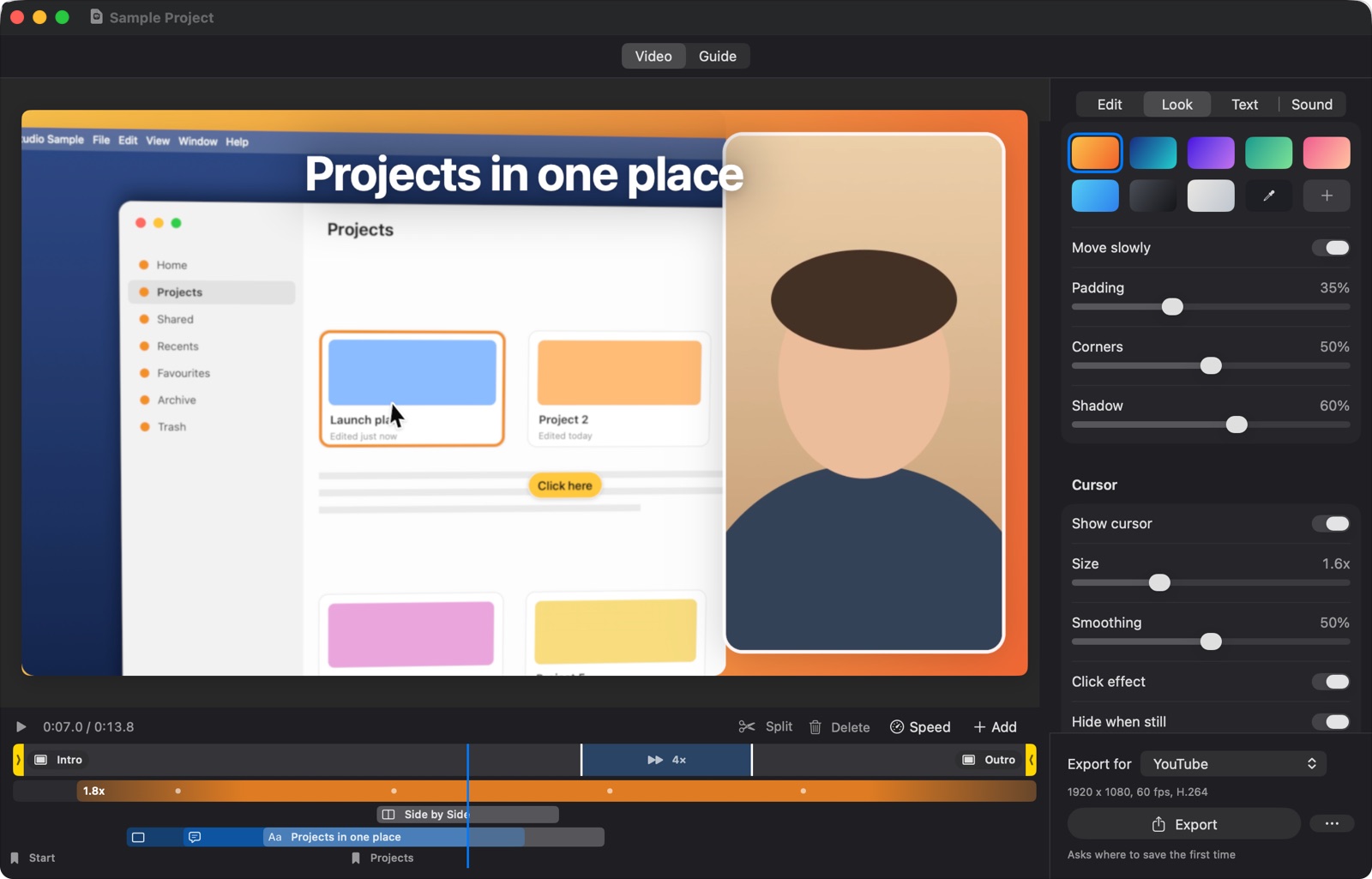
Everything a screen video needs
AEShot Studio makes the choices a video editor would, so no editing skills are needed. Change only what you want.
Zooms where you click
Every click becomes a smooth zoom, with a slight 3D tilt or another effect and motion blur, and any zoom can be set by hand. The cursor is smoothed, larger and shows every click.
You on camera
Your camera in a bubble that moves out of the pointer’s way, on its own for an intro, or side by side with the screen. On a Mac, blur the room behind you, or replace it with the video’s background.
Sound and captions
Enhance your voice, reduce background noise and add music that lowers itself while you speak. Captions of what you say are made on your computer, on a Mac with macOS 26 in more than 50 languages.
Titles and callouts
Titles that animate in, and callouts that stay on what they mark at every zoom. Intro and outro cards, keyboard shortcuts on screen, chapters, and an end card whose button gets clicked.
Cuts and pace
Trim, cut and play parts faster. Speed Up Waiting hurries through downloads and builds, Tighten Pauses cuts long silences, and transitions fade, zoom through or slide.
Your look
Six looks and your own saved ones, with your logo, color and font. Backgrounds that move slowly, or your own picture as a wallpaper.
Step-by-step guides
Create Guide takes a screenshot at every click, with a ring where you clicked. Make a video and its guide at once, add arrows, highlights and redaction, and export as PDF, web page or Markdown.
Ready to post
YouTube in 1080p or 4K, vertical video that follows the cursor for Shorts, Reels and TikTok, LinkedIn, X or your own size, up to 120 fps. MP4 with chapter markers, or an animated GIF.
See it in action
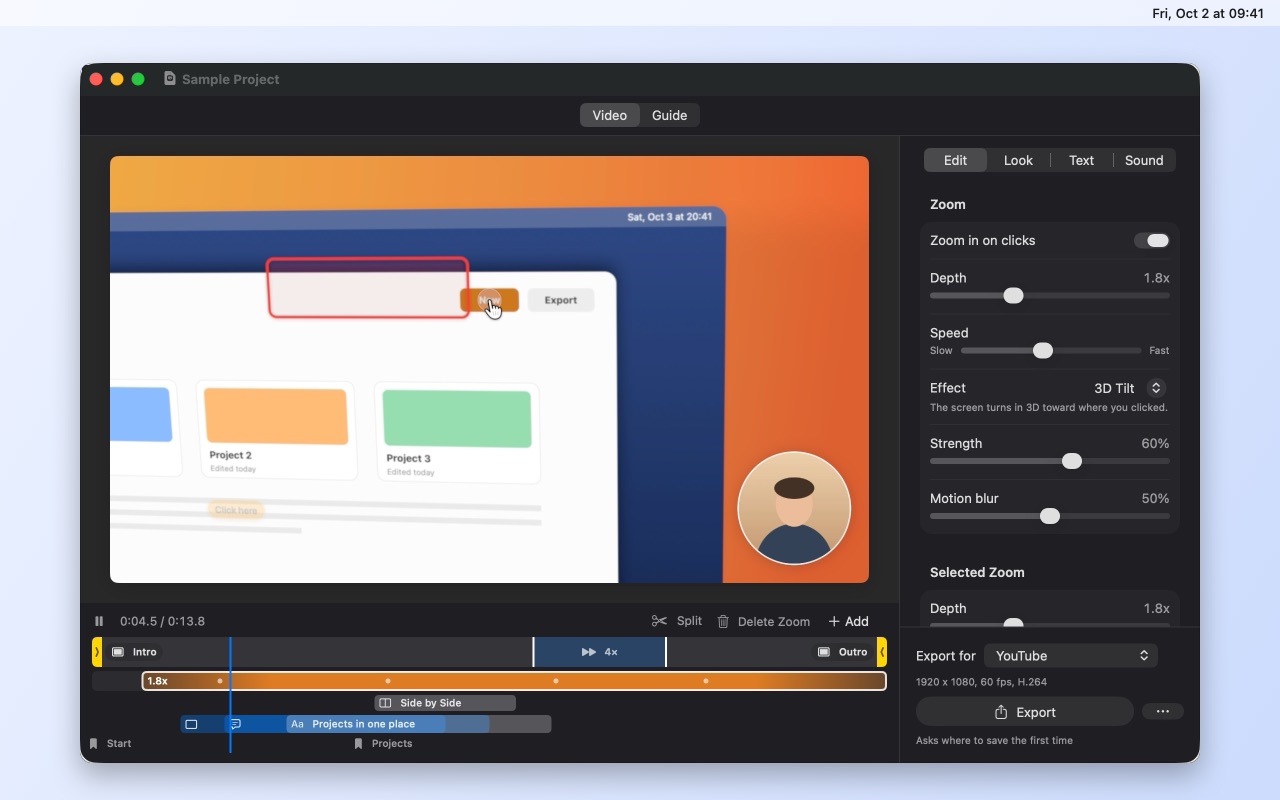
Zooms on its own
Every click becomes a smooth zoom with a slight 3D tilt, and the zoom settings stay right beside the video.
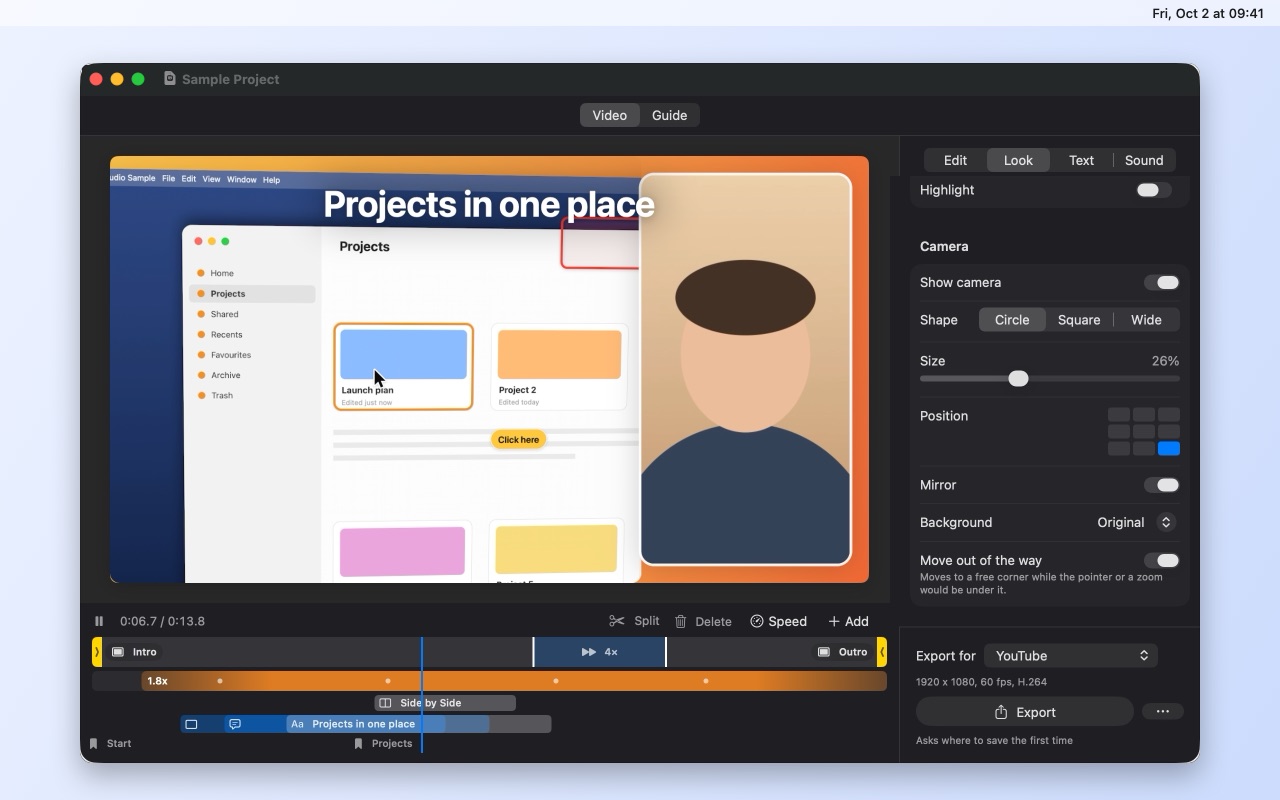
You, beside your screen
Your camera in a round bubble, or side by side with the screen for the moments that need you.
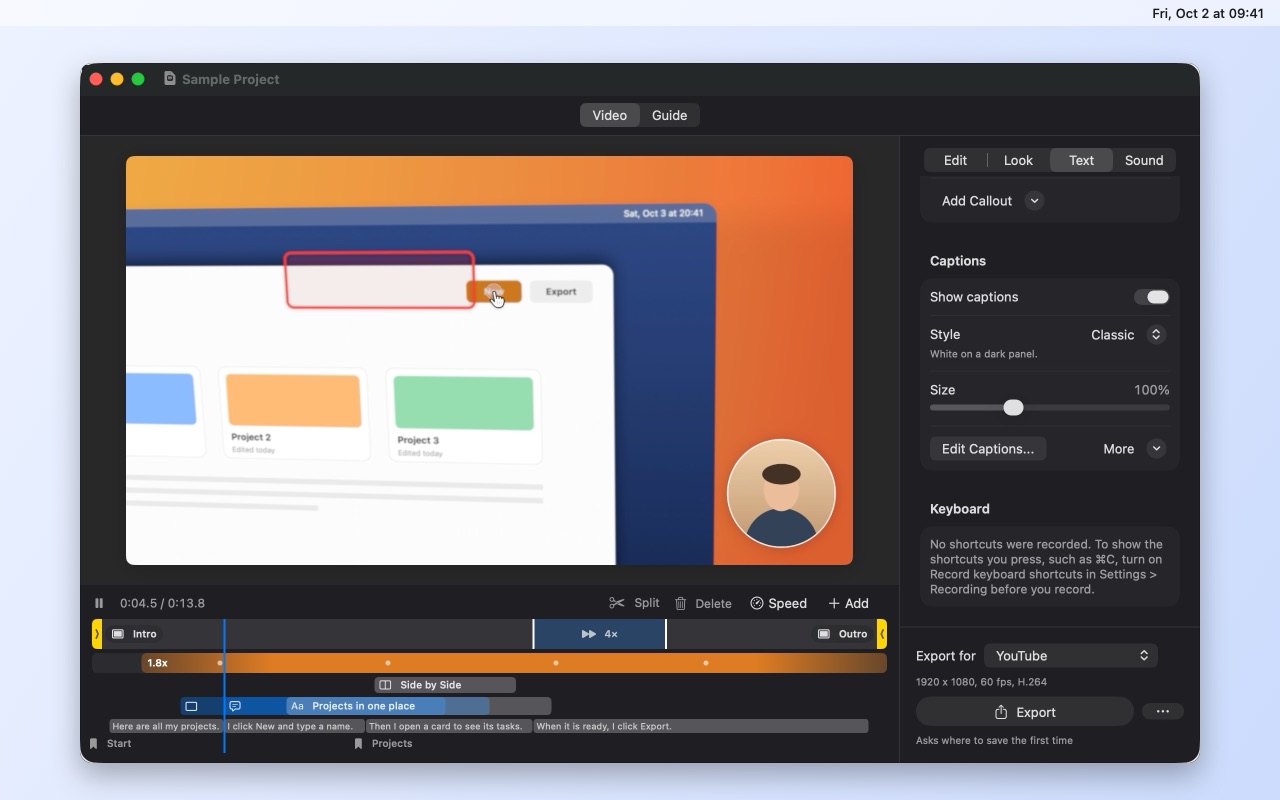
Captions from your voice
What you say becomes captions, made on your computer, and you can edit them like any text.
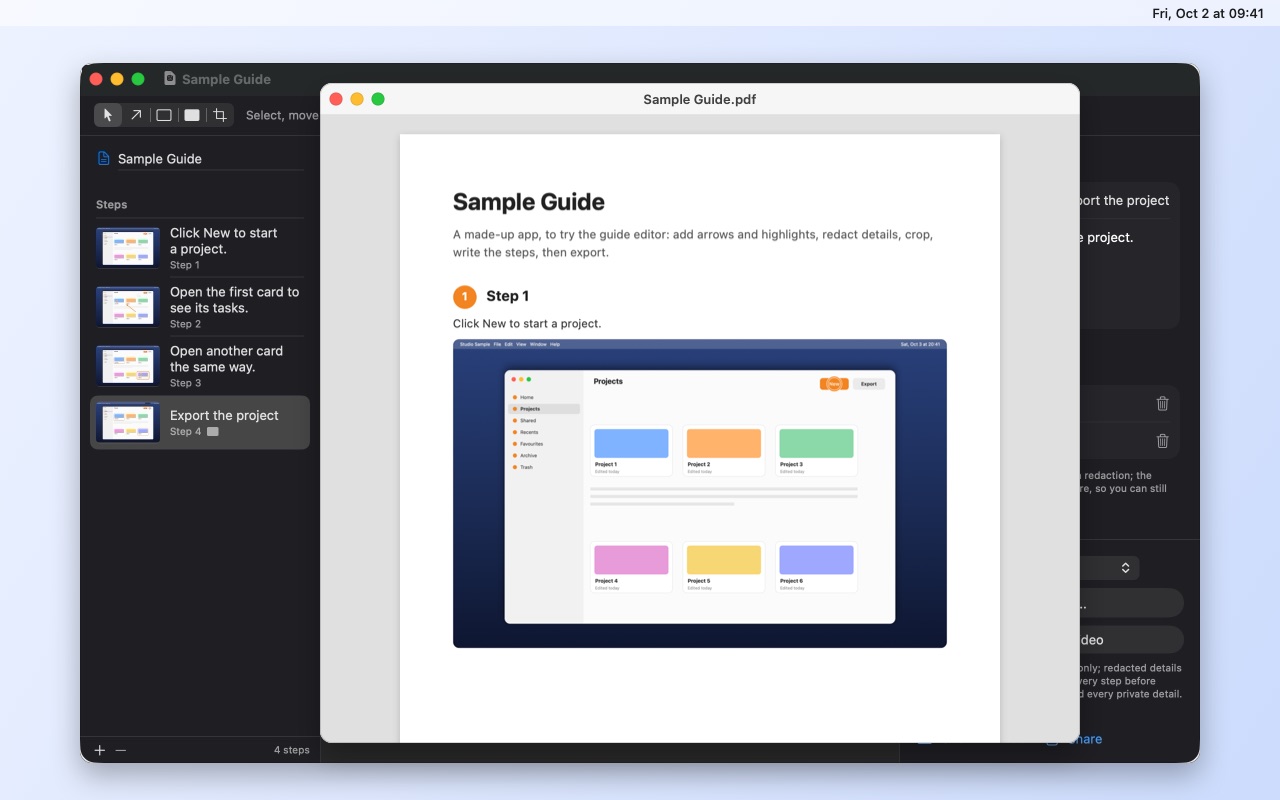
A guide from the same clicks
Each click becomes a step with its screenshot. Add arrows and highlights, then export the guide as a PDF.
Free. Nothing to buy.
AEShot Studio is free, like every AEShot app: nothing to buy and no ads. Every feature is yours from the first launch.
Private by design
Everything happens on your computer: captions, voice processing and the camera background are computed there, and nothing is uploaded. No account, no ads, no tracking of what you do. AEShot Studio contacts aeshot.com only to look for a newer version and to count its installations anonymously, and you can turn both off.
What people say about AEShot Studio
Tell others what you think of AEShot Studio.
Reviews come from people who use the app, written in the app or here with its installation ID, one per installation. Each review is read before it appears. How reviews work
Common questions
When will AEShot Studio be available?
Soon, here on aeshot.com. Want to hear when it is ready? Write to support@aeshot.com.
What will it cost?
Nothing. AEShot Studio is free, with every feature, and there is nothing to buy.
Which computers does it run on?
On a Mac with Apple silicon and macOS 14 Sonoma or later. Recording the microphone needs macOS 15, and on macOS 26 captions come in more than 50 languages. The Windows and Linux versions follow, with their own requirements.
Are my recordings uploaded?
No. Recordings, guides and exports are saved on your computer, in the folders you choose, and captions, voice processing and the camera background are computed there too. The privacy policy has the details.
How is it different from AEShot Capture?
AEShot Capture is the quick screenshot and recording app, always one shortcut away. AEShot Studio turns screen recordings into finished videos and guides. They are separate apps, both free.
Do I need to know video editing?
No. AEShot Studio does the zooms, the cursor and the background on its own. You change only what you want.
How do I write a review?
From inside AEShot Studio: choose Write a Review… in the app menu or in Settings › General. Each installation can send one review, and it appears on aeshot.com after it is checked. How reviews work
More AEShot apps

AEShot Capture
Screenshots and screen recording

AEShot Sync
Safe backups to any drive

AEShot PDF
Edit, sign and combine PDFs